
AI UX Case Study
Professional Designers & GenAI Tools
Understanding how professional designers actually use AI image generation tools in practice and translating those findings into design direction for more intuitive, controllable interfaces.
Challenge
Most AI image tools are built around text prompting, but many designers think visually, work iteratively, and need more direct ways to express intent and control results.
Contribution
I studied real professional workflows, identified recurring UX breakdowns, and translated them into concrete design opportunities for future AI image interfaces.
Research contribution
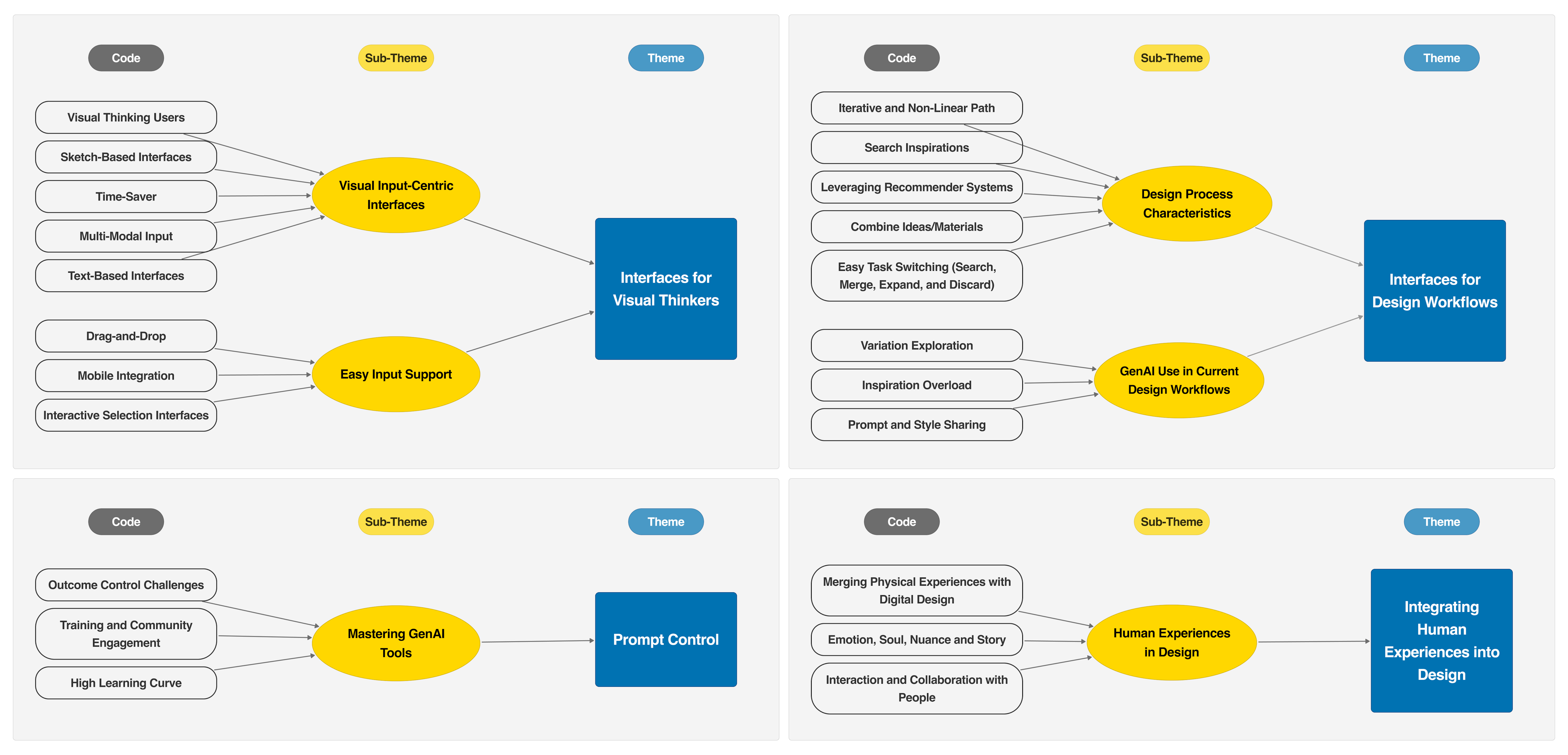
Based on interviews with 16 professional designers, this study identified four recurring UX breakdowns in current GenAI image tools and translated them into concrete interface opportunities.
Problem
AI image tools don’t match how designers actually work
Generative AI tools are increasingly used in design practice, but most interfaces assume that users can express intent through text prompts. This does not reflect how many designers actually think and create.
I investigated how professional designers use GenAI image generation tools in real workflows, where those tools help, and where current interaction models break down.
Designers are visual thinkers, but current AI image tools still depend heavily on text prompting, creating friction when users need to express intent visually.
The core issue was not only model capability. It was a mismatch between interface design and visual, iterative creative work.
Users and context
Designers think visually and work iteratively
This project focused on professional designers working across UX/UI, 2D/3D, concept, interior, and early-phase design. Their work is highly visual, non-linear, and iterative: they collect references, compare alternatives, combine ideas, and progressively refine concepts.
Current GenAI tools often follow a much more linear interaction model—prompt in, output out—which creates friction for workflows built on exploration, adjustment, and visual reasoning.
My role
I translated user research into design direction
I planned and conducted qualitative interviews, analyzed the data through thematic synthesis, and translated the findings into product-relevant design implications for future AI image tools.
Process
From observation to actionable product direction
01 · Study
Interviewed professional designers
I conducted in-depth interviews to understand how designers were already using GenAI tools in daily work.
02 · Analyze
Identified recurring UX breakdowns
I looked for patterns in how designers expressed intent, iterated on ideas, and tried to control AI outputs.
03 · Synthesize
Structured four core themes
I synthesized the findings into four themes that described where current interfaces fail to support professional design practice.
04 · Translate
Defined design opportunities
I turned the findings into actionable interaction design direction for future multimodal, workflow-aware AI tools.

Key insights
What designers struggle with today
Designers are visual thinkers
Many participants found it difficult to translate visual ideas into text prompts and wanted more direct, sketch- or image-based ways to communicate intent.
Workflows are iterative, not linear
Designers move fluidly between searching, combining, expanding, and discarding ideas, but most AI tools still support a one-step generation model.
Prompt control is hard
Getting the “right” result often required repeated trial and error, prompting workarounds such as reverse-engineering prompts and maintaining shared prompt libraries.
Design depends on emotion and lived experience
Participants emphasized storytelling, physical references, and human collaboration as central to design quality—areas current tools barely support.
Design direction
Designing AI tools for real creative workflows

Support multimodal input
Future tools should combine text with sketches, images, and other visual references so users can express ideas more naturally.
Enable iterative exploration
Interfaces should support searching, combining, comparing, and refining rather than treating generation as a single request-response step.
Improve controllability and collaboration
Designers need better ways to steer results, share styles and prompts, and work with others around a consistent visual direction.
Evidence
What the study made visible
Visual thinking clashes with text-first tools
Participants repeatedly described the effort of translating visual ideas into prompts and asked for sketch, image, and multimodal input instead.
Real workflows are iterative and collaborative
Designers wanted to search, compare, remix, and share prompts and styles across teams rather than work through isolated one-shot generations.
Outcomes
Impact of the work
Reframed AI UX as an interaction problem
The project showed that improving AI tools is not only about stronger models, but about better interaction patterns for expressing intent and supporting creative work.
Informed later multimodal design work
The findings directly informed my later projects on visual prompting, multimodal refinement, and more controllable AI interfaces.
Reflection
What I learned
This project clarified that AI UX problems often begin before generation quality: they begin with how users communicate intent, iterate on ideas, and integrate tools into real workflows. Understanding those patterns gave me a much stronger foundation for designing new interaction models later on.