
AI UX Case Study
Generative VR Texturing Tool
Designing an immersive AI workflow for generating, previewing, and applying textures directly on 3D vehicles in VR.
Challenge
Most AI image tools assume a desktop workflow. In VR, that breaks immersion, separates generation from 3D context, and makes texture exploration harder for users who are new to texturing or prompt-based tools.
Contribution
I designed a VR workflow that combines prompt input, sketching, in-context texture preview, and output management so novice users can explore surface designs more fluidly inside immersive space.
Research contribution
Developed through a design science approach and evaluated with novice automotive designers, this project turned immersive workflow pain points into concrete interaction requirements for AI-supported VR creation.
Problem
Texture design in 3D is highly contextual. Users need to see materials on form, compare alternatives in place, and keep momentum while exploring. Existing AI image tools can generate textures, but they usually live outside VR and require users to switch workflows, import static outputs, and judge results away from the object they are designing.
Desktop handoffs break creative flow
Generating textures outside VR interrupts immersive work and forces users to mentally translate between 2D tools and 3D results.
Novices need lower-friction creation tools
Traditional texture tools require expert knowledge, while pre-made skins limit expression and do not support personal customization.
The design opportunity was not just to generate textures in VR, but to make generation usable as part of an immersive comparison-and-refinement loop.
Users and context
Designing for novice creators in immersive automotive customization
This project focused on users who are comfortable with design thinking but unfamiliar with VR texturing or prompt-heavy AI workflows. In automotive settings, surface design decisions depend on scale, curvature, and context, so textures need to be evaluated directly on the vehicle rather than as detached 2D images.
My role
I translated novice user needs into an immersive interaction model
I defined the UX opportunity, shaped the interaction direction, built the prototype in Unity, and translated evaluation findings into design recommendations for GenAI tools in VR. My work focused on how users enter prompts, sketch textures, preview results, and manage iterations without losing spatial context.
Process
From workflow friction to a validated in-VR creation loop
01 · Understand
Mapped the friction in existing workflows
I examined why current texturing and GenAI workflows were hard for novices: too much tool switching, too much text entry, and too little in-context feedback.
02 · Define
Established the design direction
I shaped the experience around multimodal input, direct interaction with 3D objects, in-context texture preview, and support for iterative exploration rather than one-shot generation.
03 · Prototype
Built GenVRTex in Unity
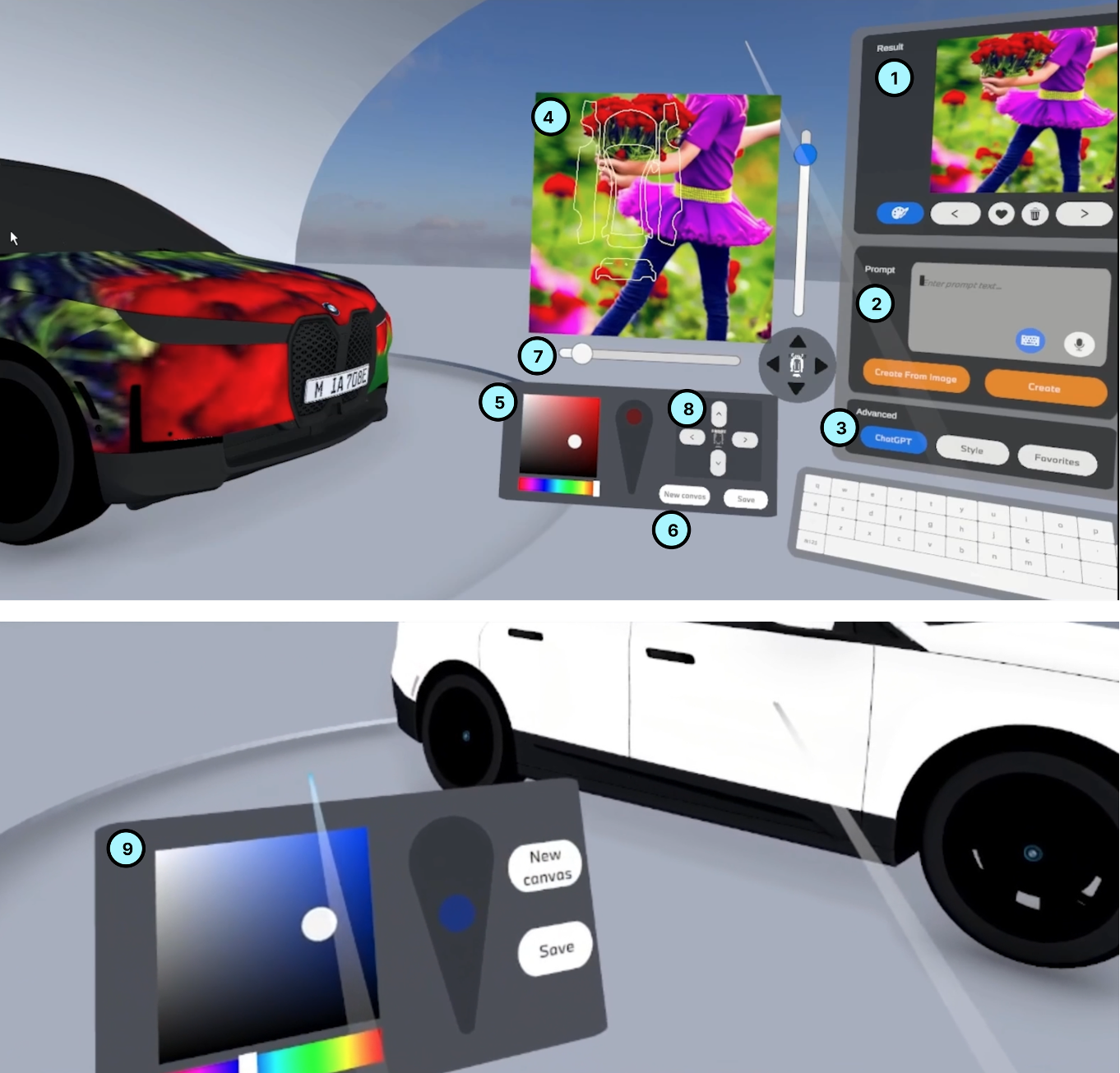
I implemented a working VR system that supports voice and keyboard prompt entry, sketching on 3D objects and a 2D canvas, history management, and texture positioning controls.
04 · Validate
Tested the workflow with novice users
I evaluated how nine designers with limited VR texturing experience used the system, what felt intuitive, and where the interaction still needed refinement.
Final solution
An immersive workflow for generating, previewing, and adjusting textures

Multimodal prompt entry
Users can enter prompts via voice or virtual keyboard and combine text with sketches, reducing dependence on a single input method.
In-context texture preview
Generated textures can be projected directly onto the 3D vehicle, making it easier to judge fit, scale, and overall direction in place.
Iterative output management
Users can browse, favorite, revisit, and generate variations from previous results instead of restarting from scratch each time.
Key design decisions
Five decisions that shaped the experience
1. Keep creation inside VR
The workflow avoids unnecessary handoffs to desktop tools so users can evaluate textures where they matter: on the 3D object, at immersive scale.
2. Support multiple input paths for novices
Because VR text entry is demanding, the system offers voice, keyboard, and sketch-based input so users can choose the method that feels most accessible in the moment.
3. Treat generation as iterative exploration
History, favorites, and variation workflows make generation part of an ongoing design loop rather than a one-time command.
4. Add lightweight prompt assistance
Predefined styles and LLM-based prompt refinement help novice users get started without demanding expert prompt-writing skills.
5. Preserve spatial adjustment after generation
Texture movement and rotation controls let users refine fit on the object without regenerating everything, which is especially important on curved surfaces.
Validation
What validation showed
I evaluated the prototype with nine automotive designers who had limited experience with VR texturing or GenAI tools. The study focused on usability, input preferences, prompt creation, and how well the workflow supported iterative exploration.
Voice was preferred for speed
Participants found speech faster and less physically demanding than virtual keyboard input, while still valuing keyboard entry for privacy and precise editing.
Drawing was promising but harder to control
Sketching directly in VR supported visual thinking, but novice users needed better spatial navigation and more precise drawing controls.
Output history mattered
Participants valued being able to revisit and branch from previous generations, which supported a more iterative and less frustrating workflow.
Curved surfaces changed the design constraints
Large single images often distorted on car geometry, so repeated patterns and post-generation adjustment controls became especially important.
Outcomes
What this project showed
Workflow fit matters as much as model capability
AI generation becomes more useful when it is embedded in the user’s spatial task rather than treated as a detached image-generation step.
Immersive context improves evaluation
Previewing textures directly on a vehicle supports better judgment than evaluating outputs outside VR and applying them later.
Multimodal input lowers the barrier for novices
Offering voice, keyboard, and sketching gives users more ways to express intent and reduces reliance on expert-level prompting.
Iteration needs stronger support in VR
The study highlighted next steps around smoother input transitions, better output management, and more precise texture control on complex surfaces.
Reflection
Designing AI for VR means designing around context, not only commands
This project reinforced that immersive AI tools should be designed around the way users inspect, compare, and refine work in space. The most important challenge was not only generating images, but helping users move between intent, output, and evaluation without leaving the environment where decisions are made.